
Changelog
Last updated January 22, 2026
January 2026
UDS
-
Table 5
- We fixed a bug that caused Line 33 (Total Facility and Non-Clinical Support Personnel) to be miscalculated.
-
Table 6A
- Line 26c3 now reads from the
Opioid Use Disorder Prescriptionsdata element to follow guidance from HRSA that says to count medication administrations and/or prescriptions. (Previously, we were only countingOpioid Use Disorder Administrations.) - Line 26e (Childhood development screenings and evaluations) is now limited to ages 0 - 5 (previously it was limited to ages 0 - 18).
- Line 26c3 now reads from the
-
Table 6B
- We fixed a bug in Section A (Age Categories for Prenatal Care Patients) that excluded patients with a prenatal care treatment visit on Dec 31.
-
Table 7
- We fixed a bug that excluded patients from snapshots of the diabetes measure. Only snapshots taken after 1/20/2025 will have data for this measure.
Quality Measures
- The Quality Measures results page now includes sub-navigation for easier orientation and navigation.
- You can now analyze why a patient is included in a measure using the new measure results timeline.
- We revised the documentation for the Quality Measures module.
Other
- We improved the SQL version history with clearer labeling and moved it into the SQL editor for easier access while writing queries.
- The SQL editor is now wider, with the option to hide or show the schema browser and SQL requirements sidebar.
- We added
redetermination_due_ontordm.roster_membershipsfor tracking the renewal of Medicaid and other health plans. - The “Report discrepancy” button is now an icon on the left of each row for the following listings pages: patients, measure results, claims, and visits.
- We fixed a bug which sometimes caused outdated Pipeline failure emails to be sent.
November–December 2025
Pipeline
- We improved the performance of the Measures page.
- New items now include default SQL with all required columns pre-filled, making it easier to start queries.
- We improved the layout and usability of the extracts page in Acquisition Plans.
Reports and Dashboards
- A new Executive Dashboard library item is available.
- A new UDS Comparison Dashboard library item is available.
- We added a new standard param:
Care gaps (Standard). - Report exports now include the report name in the filename.
- When you select a cell in the results grid, the whole row now highlights.
- Data grid result headers now stay visible, making it easier to view and interpret the data.
- We fixed an issue in Dashboard text tiles that caused the modal to close unexpectedly when selecting all text.
- UDS Table 6b and Table 7 now link directly to the relevant quality measures.
Other
- SSO settings now require the client secret expiration date to be in the future.
- We now send warning emails starting 3 weeks before SSO client secret expiration, and for up to 7 days after it expires.
- We fixed an issue where record discrepancy values of
falsewere showing as--. rdm.standard_quality_measure_value_set_codesnow has mappings for the Standard Quality Measure “Initiation And Engagement Of Substance Use Disorder Treatment Rate 1 Initiation (UDS 2025 Table 6B)”.- Markdown links now display an indicator that they open in a new window.
- The Visit Planning print view now has a bigger patient name and darker border to more easily distinguish patients.
- Visit Calendar now shows a helpful message when no results are available.
- We added Provider Teams to the Visit Calendar filters.
- Searching any list (patients, visits, measure results, claims, and payments) now highlights matches and clarifies searchable fields.
- Added
visit_id,value,risk_identified, andnotestosocial_risk_factor_screens.
September–October 2025
Reports
- Date filters have two new options: “Year to date (through yesterday)” and “Year to date (through today)”.
- We added a new standard param:
Measures (Standard). - Dashboards have a new parameter type for Quality Measure tiles: Health Center.
- We added a new standard report: Standard Quality Measure Value Set Codes. Use this report to see all the value set codes associated with a Standard Quality Measure from this year.
- Reports are exported with column names that match the SQL query results directly.
- Data Grid supports links to other pages
Standard report updates
- Rename Third next available appointment report to “Average days to third next available appointment”.
- Improve description and date parameters of No-show rate YTD (now renamed to “No-show rate”).
- Improve description, SQL, and date parameters of Unique patients YTD (now renamed to “Unique patients”).
- Improve description, SQL, and date parameters of Visit Volume (now renamed to “Monthly visit volume”).
- Inprove description and introduce Date parameter of New patients YTD (now renamed to “New patients”).
- Improve visualization and remove date parameter of Visit Volume (YTD) standard report (now renamed to “Visit volume”).
- Relevant SQL Search is now a standard report. It searched more tables and has links to their SQL definitions. Existing Relevant SQL Search reports imported from the library have been archived.
Other
- Data Uploads now support column names with new lines.
- We added a new reference table:
rdm.standard_quality_measure_value_sets. - We updated the description of the Hep B Antigen Labs data element.
UDS
- Table 6A only displays the applicable billing and diagnosis codes, we’ve removed the OID values.
- The SQL supporting Table 5 has been reworked to improve clarity.
- We added a column
hrsa_in_scope_locationto Visits and Locations, to help exclude out of scope locations (i.e., those not on HRSA’s Form 5B or Form 5C). Read more about inclusion criteria for UDS quality measures. - Additional rows in UDS Table 6A are powered by data elements (21a. Hepatitis B test, 21b. Hepatitis C test, and 26a. Childhood lead test). Read more about counting services for Table 6A.
- HRSA published a 2025 guide with several mistaken CPT codes for UDS Table 6A lines 24 and 24a. These are now updated to match the most recent guidance.
August 2025
UDS
- Some rows in UDS Table 6A are powered by data elements ( Read more about counting services for Table 6A).
Reports
- Relative dates support additional functions, max and min, to support complex SQL queries.
- Relative dates have an additional option: in the last 5 years.
- We updated Executive Dashboard standard reports to use the new Date parameter and ensure they have provider, provider teams, programs, and location as parameters.
Visit Planning
- We updated the print view to be easier to read with a layout that matches the app.
Outbound SFTP transmissions
- You can see a list of all outbound SFTP data transmissions by going to Configure > Outbound SFTP ( Read more about Relevant’s Outbound SFTP offering).
- You can see the last time a report was used for an outbound SFTP transmission on the report’s page, along with the success or error status.
June–July 2025
Data Pipeline
- We redesigned the individual Measure, Care Gap, and Risk Model pages to better organize the information.
- You can copy the Measure, Care Gap, and SQL-based Risk Model code using the click to copy button.
- A Run button has been added to the Care Gap and Risk Model pages.
- We fixed an issue on the pipeline Population, Care Gap, and Risk Model pages where error messages were hidden.
Reports & Dashboards
- We upgraded Date parameters to support relative logic like “in the last week”. All prior date parameters are renamed to “Fixed date” and still work as before.
Other
- We fixed a bug in Data Explorer: now you can search by billing code, diagnosis code, and other fields with lots of values, without the page crashing.
- We added ‘Last complete 12 months’ as an option in the Measurement Period dropdown on Measures.
- We fixed a bug on Quality Measure tiles where filters weren’t preserved when clicking on the tile title.
- We enhanced the SQL and Vega-lite editors so that autocompletes, syntax highlighting, and find and replace are easier ( See the keyboard shortcuts here.)
- We made some speed improvements to the Quality Measures page – especially for health centers with lots of payers, providers, and locations.
April–May 2025
Data uploads
- You can see a list of all Data Uploads by going to Configure > Data Uploads.
- You can filter the list of Data Uploads by table name and status.
- You can see who uploaded data and when.
Reports
- Restricted reports can be granted access to users with selected roles.
- Reports now use the full width of the browser window.
Other
- All library data elements that reference the
rdm.cqm_value_set_codestable will now be using the codes that have latest = TRUE. No changes were made to data pipelines in heath center Relevant instances. All new health center Relevant implementations going forward will start with a default data pipeline that only uses codes in the latest release of CQM value sets. -
We fixed an alignment issue on show pages across the app.
- ‘Appointment Type’ is now a standard parameter.
- The Measurement Period selector for Quality Measures now highlights the most useful options.
- The virtual machines that power Relevant have been upgraded and modernized.
- Dashboard tiles now run in parallel, speeding up dashboard load times.
- We added to or updated several reference tables:
rdm.cqm_value_set_codes,rdm.hedis_value_set_codes,rdm.rxnorm_crosswalk_ndc, andrdm.cms_non_hedis_contraceptive_value_set_codes.
March 2025
Record discrepancies
- Screenshots can now be attached to record discrepancies.
- Record discrepancy descriptions now include the name of the associated Care Gap or Measure.
- Record discrepancies can be filtered by notes and record details.
UDS updates
- Our UDS 2024 Depression Remission and Cervical Cancer Screening measures have better and more descriptive measurement values now.
UDS+ updates
- Sexual orientation and gender identity information are no longer included in UDS+ submissions, as per v2.0 of the IG
Other
- When viewing a Transformer, we updated the look and feel.
- We added a ‘Copy SQL’ button to Transformers and Data Elements.
- We added a new field, Technical Notes, to Reports.
- All Data Elements now have basic descriptions.
- You can search patients from any page in the app using the top level navigation.
Jan–Feb 2025
UDS updates
- UDS snapshots. We updated the
uds_table_7_birth_weight_patient_mappingsview to capture data in column 1a (previously only covered 1b–1d). We deprecated theuds_table_7_prenatal_deliveries_sqltable; it contains historical data from UDS reporting year 2023, but new data will only be inserted into theuds_table_7_birth_weight_patientstable. - We added 2 new database functions to the
rdmschema:uds_year()anduds_plus_year(). - We updated the UDS ZIP Codes table to use the left 5 digits of ZIP codes in the ZIP+4 format, e.g., 90210-1234 will be counted as 90210.
- For 330H awardees: we updated the
Public housing patientsfilter in the UDS module so that it defines public housing patients with the same logic as Table 4, Line 26: “all patients seen at a service delivery site located in or immediately accessible to public housing.” - We introduced several library reports to support reporting for some UDS appendices; see the UDS Appendices article for details.
- We updated the UDS Module Table 6B Section A measure results drillthru to match the count of patients reported on the Table 6B Section A cells.
- We updated the UDS Module Table 6A Selected Diagnoses Column A Visit Count to count the number of distinct visits with the selected diagnosis code. Previously, a bug caused visits mapped to more than one UDS visit set to be counted as multiple visits.
- We updated the UDS Module Table 7 Section A Deliveries and Birth Weight (By Race & Ethnicity) Column 1a Prenatal Care Patients Who Delivered During the Year. Column 1a cells now contain the distinct count of patients who delivered. Patients with more than one row in the pregnancy_deliveries table will be only counted once in Column 1a.
- We updated the UDS Module Table 7 Line 0 HIV-Positive Pregnant Patients to include patients with pregnancy observations who have a HIV diagnosis before their pregnancy observation.
UDS+ updates
- We fixed a bug where every patient’s housing status was “other”.
- The sexual orientation “Don’t know” is now mapped to “Asked but no answer”, per the US Core specification.
Pipeline
- When you search the pipeline pages, any name matches will appear first in the list. Description and SQL matches will appear after.
- Transformer descriptions support markdown.
Data Elements
- We added two new tables,
rdm.substance_use_casesandrdm.substance_use_treatments, to support the new UDS 2025 measure for [Initiation and Engagement of Substance Use Disorder Treatment](https://ecqi.healthit.gov/ecqm/ec/2025/cms0137v13?qt-tabs_measure=measure-information). - We added a new field to the visits data element,
rdm.visits.panelto clarify mapping the Panel Visit Set Memberships data element. - We added two new raw fields to the patients data element,
rdm.patients.sexual_orientation_rawandrdm.patients.gender_identity_raw, to represent sexual orientation and gender identity (SOGI) as written in the EHR, as opposed to the UDS SOGI categories as mapped in Relevant. - We added four new tables,
rdm.family_planning_need_screens,rdm.financial_strain_screens,rdm.opioid_use_disorder_prescriptions, andrdm.social_risk_factor_screens, to support the UDS Appendices.
Other
- We introduced a new standard parameter type for reports: Measurement Period End Date. This parameter can also be linked to Quality Measure tiles on dashboards.
- We updated the instructions for restricting a report to be more concise and accurate.
- We converted the
definition_sourcefield on some tables from integer to varchar, so the possible values are nowcustomandstandard. If you have a report that checks the value ofdefinition_source, we migrated it to ensure it uses the new string values. - You can now change the status of a standard report.
- You can now share and bookmark dashboards with specific parameter values.
- User pages now show a list of abilities along with each role that the user has.
Nov–Dec 2024
Reports
- We introduced some new standard parameter types for reports: Programs, Visit Types, and Measure Sets. Custom parameter types that already had these names have now had
(Custom)appended to their names. - We added a new status to reports: “Published (hidden)”. Reports with this status are filtered out by default on the main reports listing page, but you can view them by using the “Status” filter.
- We introduced a new field on reports:
primary_use. A report can have a primary use of: standalone report, dashboard only, or both. - We introduced a short-lived field on reports:
dashboard_only. This field was available for 2 weeks, and has since been replaced with a combination of the new status “Published (hidden)” and the new fieldprimary_use. - We introduced some Standard Reports - these reports are automatically available on every instance and are kept up to date by Relevant. As of Dec 20, these existing standard reports all have the status “Published (hidden)”, meaning they will not show by default on the reports listing page.
Dashboards
- Dashboards have an exciting new tile type: Quality Measure tiles!
- Dashboard parameters only show you the parameter types that exist in the report tiles.
- Dashboards parameters can now automatically populate all the links to their report views: If you add report tiles to a dashboard, then create a new dashboard parameter, and enter the exact same name and type for the parameter as the reports use, all the links will automatically choose the matching parameter, saving you some clicks.
- Dashboards automatically run all their reports when the page is first loaded.
- Dashboard tiles now have an info icon in their name, showing the report’s or Quality Measure’s description.
Data Elements
- Data Element SQL can now be compared to the library version, using the “Library > Compare to default” buttons.
- We added a new table —
rdm.referrals--- and a new standard care gap for tracking open referrals. The referrals data element is meant for referrals opened by providers at the health center, and typically includes internal and outgoing referrals. - We added 3 new data elements to track appointment utilization:
rdm.trended_third_next_available_appointment_slots,rdm.third_next_available_appointment_slot_groups, andrdm.available_appointment_slots. - We added
rdm.orders. The orders data element is meant for records of procedures, imaging, and/or labs ordered by providers, and is useful for tracking whether orders are being completed in a timely manner.
Other
- We added a standard non-inverted diabetes A1C control UDS measure.
Sep–Oct 2024
UDS updates
- Map “X” gender identity to UDS Table 3B, Line 24
- Map “Hispanic, Latino/a, Spanish Origin, Combined” ethnicity to UDS Table 3B, column a5
- Fixed a bug that excluded I10 from UDS Table 6A, line 11
- Removed the “update in-progress” note from UDS Table 6B
Data Pipeline: Measures
- The page has an updated look and feel.
- You can search Measures by name using the search bar (no more control+f)
- You can see and filter Measures by Measure Set.
Other
- When importing a data element or transformer from the library, the imported version will automatically become enabled.
- Visit and appointment date filters have 3 new options: Yesterday, Today, and Tomorrow.
- Starting Oct 24, we are retiring Visual Query Data Elements. Data Elements which have never been run will be unmapped (feel free to use the Library mapping in the future if you decide to map it!), and Data Elements which are in use will be converted to SQL.
- We updated the look and feel of our not authorized pages.
- We updated the look and feel of the Create Record Discrepancy page.
- We updated the look and feel of Risk Scores.
- We fixed a bug causing the transformer name in Monitor Pipeline screens to overlap with the start time.
- We fixed a bug causing the drag-to-reorder toggle to be misaligned when editing a report.
July–Aug 2024
Risk Model addition
- We added a new Standard Risk Model, 10-Year ASCVD Risk Score, to support the identification of patients at high risk for ASCVD.
New column on patients: preferred_name
- We added preferred_name to the patients Data Element - you can now map it in the pipeline, and a patient’s preferred name will show in parentheses on Visit Planning, the patient details page, and Data Explorer.
The library
- The library now has data elements and transformers! You can import these items to use and customize. You can also reset your data element definitions to match Relevant’s library default mapping by clicking the button on a Pipeline > Data Element page, to keep up to date with our changes.
Other updates
- Data Elements will auto-update the row count after running.
- Reports show the last run time.
- In reports, we updated the name of “Expected run time” to “Average run time”.
- The current target is displayed on the trend chart when viewing an individual Quality Measure.
- We fixed a bug causing report and dashboard parameters to be uneven and misaligned.
- Quality Measures now render markdown for many fields including description, notes, rationale, and denominator and numerator descriptions.
- Data Explorer now loads all CVX codes, so you can find immunizations even if they have less than 3 characters in the code.
- Outreach Campaigns now surface errors in their underlying audience. This can happen when the pipeline changes the ID of a records (e.g. location, provider, etc) and the audience is attempting to select patients referencing that criteria.
- HCCNs can now see the status of the latest data aggregation from member instances on the “Monitor Pipeline” page.
- We fixed a bug causing large numbers to be cut off on the visit calendar bar chart.
- We updated the look and feel of populations in Visit Planning.
- We updated the look and feel of library tags.
- In reports, the Report Set will be displayed next to the name.
May–June 2024
Quality Measure updates
- The Quality Measures index screen now shows Location, Provider, and Payer filters by default.
- Compliance targets are now displayed on the Quality Measures index screen.
- We fixed a bug where spark lines did not render the compliance target on the Quality Measures index screen.
Data Element updates
- We added a new data element, Dental Sealant Exclusions, to support calculation of the UDS dental measure. The use of this data element should replace use of the
has_sealable_molarscolumn in Dental Assessments. - We added a column,
sealed_by_health_center, to Molar Sealant Placement Procedures. Set this column totruefor sealants placed by the health center or by another dental provider who saw the health center’s dental patient through a referral. - We added a
visit_subtypedata element that can be attached to visits through thevisits.visit_subtype_id. You can see this new column in Data Explorers and the Visit Calendar.
Other updates and bug fixes
- The Reports index now loads much faster
- Visit dates are now time zone independent
- Dropdown menus are no longer cut off when a page has a long name
- Care Gap interventions now accept markdown
- Dashboard descriptions now accept markdown
March–April 2024
Data Explorer updates
- You can filter Data Explorers by “Assigned female at birth.”
- View counts have been added to the Data Explorers page.
- Any care gap can now be added as a Data Explorer column (whether or not it has “details.”)
- When exporting a Data Explorer, the Excel file now includes a new header show showing the names of column groups.
Quality Measure updates
- Compliance targets show the number of patients above or below the compliance target.
- Compliance targets are displayed when hovering the trend chart on the Quality Measure index screen.
- Users can hide unselected items in Quality Measure bar charts.
Other updates
- Page load times are now faster, by downloading the required JavaScript on a per-page basis.
- Reports can now be archived, as well as permanently deleted.
- The library report “Relevant SQL Search” now has a “status” column instead of the “enabled” column. If you previously imported this report, we re-imported it for you to have the new changes. If you had imported and then edited this report, we left your copy untouched.
- “Nurse” has been added as a Job category in “My Settings”.
- Quality Measures now only show enabled populations in the “Compliance by…” section.
- We added a new data element, Ten Year ASCVD Risk Assessment, to support calculation of the UDS 2024 statin measure.
- We added a new data element, Advanced Illness Visits, to make it easier to calculate exclusions for several UDS quality 2024 quality measures. The Advanced Illness Case, Advanced Illness Outpatient Visit, and Inpatient Intervention data elements have all been deprecated.
- All immunization data elements now have a lot_number column. Populating this column may require mapping updates in the data pipeline.
- Alerts with no users are automatically disabled.
- Alerts can now be configured to run when the pipeline finishes.
January–February 2024
UDS updates
- Selected Services Rendered and Selected Dental Services (Table 6A). Both sections have been updated to follow the visit de-duplication guidance in the UDS manual.
- Depression Remission at Twelve Months (UDS 2023 Table 6B). Updated the numerator to count patients with any followup PHQ-9 with result < 5 within the four month followup assessment period, rather than only count patients whose most recent followup PHQ-9 has a result <5. This change can only increase the numerator and compliance of this measure. Additionally, we fixed the value set used for diagnosis of dysthymia (CQM value set OID 2.16.840.1.113883.3.67.1.101.1.254) so that these diagnoses will count for the index event. This which may increase the denominator.
- You can view the SQL powering Table 7.
Quality measure improvements
- Quality measures can now be filtered by population.
- If you’ve configured Relevant to have multiple risk models, you can now filter Quality Measures by all available risk models.
- We now show compliance percentage to the tenth of a percent.
For more details on the Quality Measures improvement, read our release announcement.
Visit Planning look and feel
Visit Planning had a number of styling improvements. Here are some that we think are particularly helpful when looking at a patient’s card in Visit Planning:
- All appointment details, including appointment reason, are grouped in the left, gray box
- The total number of care gaps moved next to the name of the Care Gap Set
- Care Gap details are organized in a table instead of a paragraph
- The Report Discrepancy button changed to an icon. You no longer need to hover to see this button.
- Quality Measure Warnings were renamed to “Quality Measure Alerts” and are collapsed by default.
Other updates
- Report authors can now create filters based on Populations, Measures, or UDS Snapshots.
- A new role called “Super Admin” includes all abilities in Relevant, including any new abilities introduced in the future. Read more.
- You can hover over multi-select filters to see which values are selected.
- You can hover over bar chart labels to see cut-off values.
- Some Data Elements have descriptions that gives guidance on the contents, where the Data Element is used in Relevant, and how to map it.
- We fixed a bug with Reports referencing a parameter value that is no longer valid; e.g. a population that has been deactivated.
- Visiting the payments module shows 3 years of historical data by default instead of nearly a decade.
- “Report discrepancy” buttons now open a new tab, so you can keep your random sample open while submitting a discrepancy.
- Data explorer filters with numbers can now use “greater than” and “less than” filters, making filtering for A1C values > 9 nice and simple.
- Reports now have a “status” column instead of a “Published/Unpublished” boolean. “Unpublished” reports now have the status “Draft”. When duplicating a report, the new report will have a “Draft” status.
November–December 2023
Minor UDS quality measure updates
- Screening for Depression and Follow-Up Plan (Table 6B, Line 21). The numerator now includes depression follow-up plans that occurred at or within 2 days of any qualifying visit, rather than just the first qualifying visit.
- Depression Remission at Twelve Months (Table 6B, Line 21a). Qualifying visits are now determined by checking for appropriate codes in the Visit Billing Codes or Visit Diagnosis Codes data elements, rather than checking in Major Depression Including Remission Cases and Dysthymia Cases. The index event is now defined as a qualifying visit with a depression diagnosis, rather than a PHQ-9 screening. In addition, an extra day was removed from the allowed period for the index event.
- Controlling High Blood Pressure (Table 7, Section B). For health centers using eClinicalWorks, the relevant_blood_pressure_readings transformer has been updated to correctly parse multiple blood pressure readings in a single visit.
Other Updates
- In Configuration -> Roles, an unused ability called “Export Finance” has been removed.
September–October 2023
UDS updates
- Drill-thru lists for UDS Table 4 (Income) and Table 6A can now be opened in Data Explorer. Read more about opening lists in Data Explorer. In addition, many UDS criteria are now available as filters in Data Explorer.
- To ensure that counts are consistent across tables, we’ve surfaced several new types of error conditions. The Zip Codes Table now displays error columns for missing or invalid payer data. Table 5 has new error rows for UDS visits which cannot be categorized into a major personnel category. (In the past, these visits were silently excluded.)
- We fixed a bug where, in rare cases, the number of drill-thru results did not match the counts in Table 6B.
- The wording in our UDS module has been updated to match the 2023 UDS manual and to use patient-centric language whenever possible.
New UDS+ page
We launched a new placeholder page to answer user questions about UDS+. Read more about UDS+ in Relevant.
Standard care gap revisions
- The “Due for DXA Scan” standard care gap was adjusted to correctly exclude female patients who already had DXA scans.
- The “Last hemoglobin A1c > 9 or missing result” and “Due for hemoglobin A1c test” care gaps were updated to prefer the alc_labs.performed_on field over the a1c_labs.result_date field when available.
Other updates
- “Last run at” times have returned to the Data Element and Transformer index pages.
- You can now see the full description of a Transformer on the Transformers index page.
- When you import a Measure from the Library, “Show in visit planning” now defaults to false.
- When exporting a Data Explorer to Excel, the export now has a friendly file name.
- Users without the “Manage Data Pipeline” ability can now see when the data was last refreshed when viewing a Quality Measure.
- We fixed a bug in Data Explorer where filters were cut off on the edge of the screen.
July–August 2023
PCMH Reporting
We’ve added new reports and measures to support the annual reporting requirements for Patient-Centered Medical Home (PCMH) recognition. Read more about PCMH Annual Reporting in Relevant.
Dashboard improvements
Report Builder Dashboards have some look-and-feel improvements:
- Dashboards now take up the full width of the screen.
- Dashboard tile parameters are collapsed by default.
- Dashboards can be run with the keyboard shortcut
CTRL+ENTER.
Configuring PHI access
Health center administrators can now configure the list of IP addresses from which PHI can be accessed. Learn more about configuring the IP allowlist.
Merging the Staging and Relevant Databases updates
We made some improvements to support the transition and overall reporting experience:
- The table browser is grouped by schema and loads 10-100x faster.
- We fixed a bug where row counts showed ‘-1’ in the table browser.
- We introduced a search path selector to support the merged database transition. Learn more about search paths.
Automated response logic for text messages
Health centers who use Relevant Outreach can now configure campaign steps to automatically respond to patients. Learn more about campaign steps.
Appointments Data Element update
We added two new columns to the Appointments Data Element: status and status_raw. Learn more.
Other updates
- A new “Open in Data Explorer” button on Patient, Visit, and Measure listings provides the ability to customize the columns and data you see. Learn more about opening lists in Data Explorer.
- Record Discrepancies now always show reported values, even if no current values exist (which is common for resolved discrepancies).
- The Quality Measures detail page received some visual updates. 🎨
- The buttons on the Compliance Trend chart are always visible, instead of only when hovering.
- Visit Planning now filters out inactive providers by default.
- Acquisition Plans which are disabled are now grayed out.
- A new standard care gap, “Due for DXA Scan,” identifies patients in need of this scan, which checks bone density.
May–June 2023
Merging the Staging and Relevant Databases
The two databases that previously comprised Relevant’s data warehouse have been combined into a single, unified database, which is now organized into schemas. It’s a big upgrade which unlocks lots of new possibilities for reporting. 🎉 Read more about the new data warehouse architecture.
UDS 2023 updates
- We flipped the switch in our UDS module; UDS data now displays for CY 2023.
- All care gaps related to UDS measures have been updated to conform to the 2023 measure specifications.
Other updates
- New standard care gaps are available to flag adult patients in need of HPV or TDAP immunizations. They can be enabled by Pipeline Administrators by going to Pipeline -> Care Gaps.
- In Data Explorer, the time element of visit and appointment dates now exports correctly. Note: see the FAQ question about times in this article about Data Explorer for tips on getting the time to display in Excel.
- New data elements are available to support PCMH reporting: Care Management Enrollments and Care Management Care Plans.
March–April 2023
New quality measures for UDS 2023
In a Program Assistance Letter, HRSA has indicated that 13 quality measures in UDS Table 6B and Table 7 will be changed for UDS 2023. We have introduced the following new quality measures; the remainder are in progress. Note: consult our separate article Changes in Relevant for UDS 2023 for a running list of all UDS changes.
- Breast Cancer Screening (minimal changes)
- Colorectal Cancer Screening (substantial changes)
- Controlling High Blood Pressure (minimal changes)
- Diabetes: Hemoglobin A1c Control (substantial changes)
- Weight Assessment and Counseling for Nutrition and Physical Activity for Children and Adolescents (minimal changes)
- Depression Remission at Twelve Months (minimal changes)
- Statin Therapy for the Prevention and Treatment of Cardiovascular Disease (minimal changes)
New data elements for UDS 2023
- Several of the new UDS 2023 quality measures reference “Nursing Home” stays, which is more specific than the “Long Term Care” stays referenced in prior-year measure definitions. We’ve added a new Nursing Home Stays data element to support these new measures. Data pipeline administrators can click Data Pipeline -> Data Elements -> Nursing Home Stays -> “Map data element” to enable the default mapping.
New care gaps
- Care gaps matching the UDS measures are being updated to conform with the 2023 measure specifications. Update: this is complete as of 5/15/23.
Other updates
- Our help center (which you’re looking at) got a new look and feel. 🎨
- Filters on Quality Measures, Visit Calendars, Productivity, and A/R Aging also got a visual upgrade.
January–February 2023
Data Explorer
We shipped a number of improvements to Data Explorer:
- You can now quickly search by patient name and MRN.
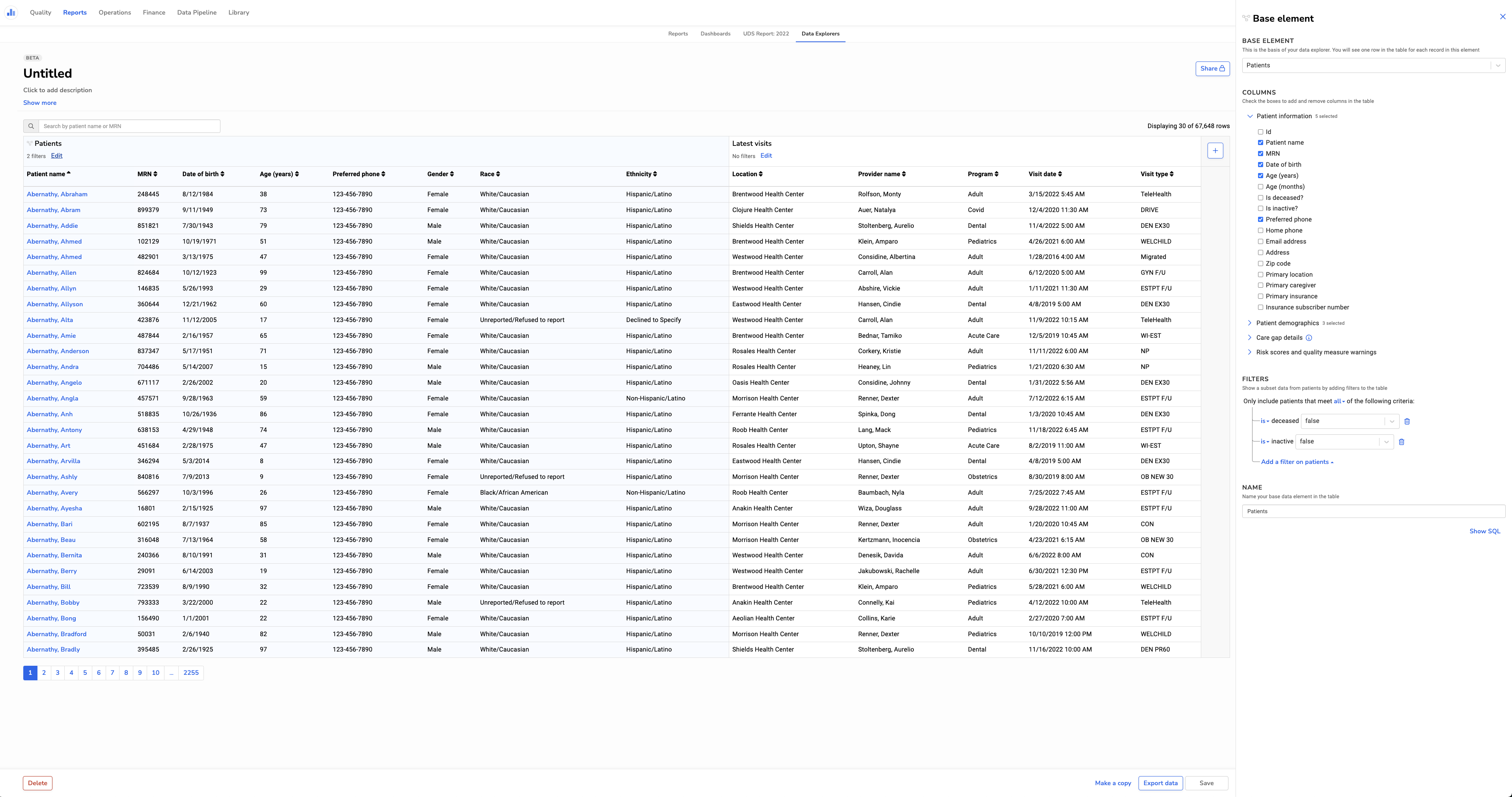
- Data Explorers now make use of the full width of the browser window, so you can see more columns at once. See what it looks like here.
- Filters are more powerful, part 1: care gaps, populations, and several other fields are now multi-selects instead of single-selects, making it easier to implement nested and/or logic.
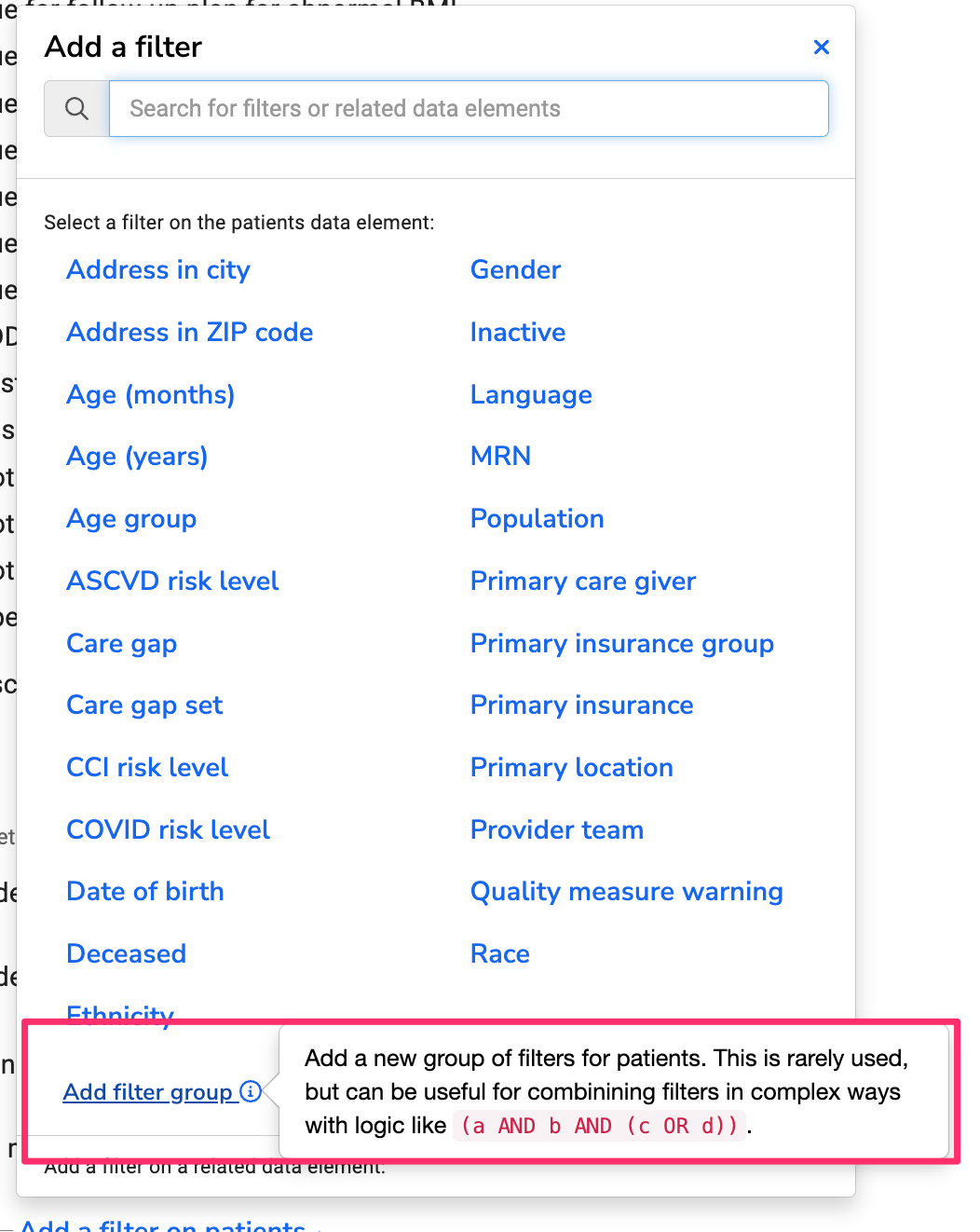
- Filters are more powerful, part 2: you can now add nested filter groups to support more complex queries. See what it looks like here.
- Data Explorers that reference deleted or disabled care gaps will no longer break the page.
Relevant Outreach
Our patient text messaging tool got a more powerful interface to define patient audiences. It’s the same interface that powers queries in Data Explorer. Read more about Relevant Outreach.
CareMessage integration
Health centers that use both Relevant and CareMessage can take advantage of a new integration that allows automatic enrollment of patients into a CareMessage program, based on audience criteria defined in Relevant. Read more about our CareMessage integration.
Other updates
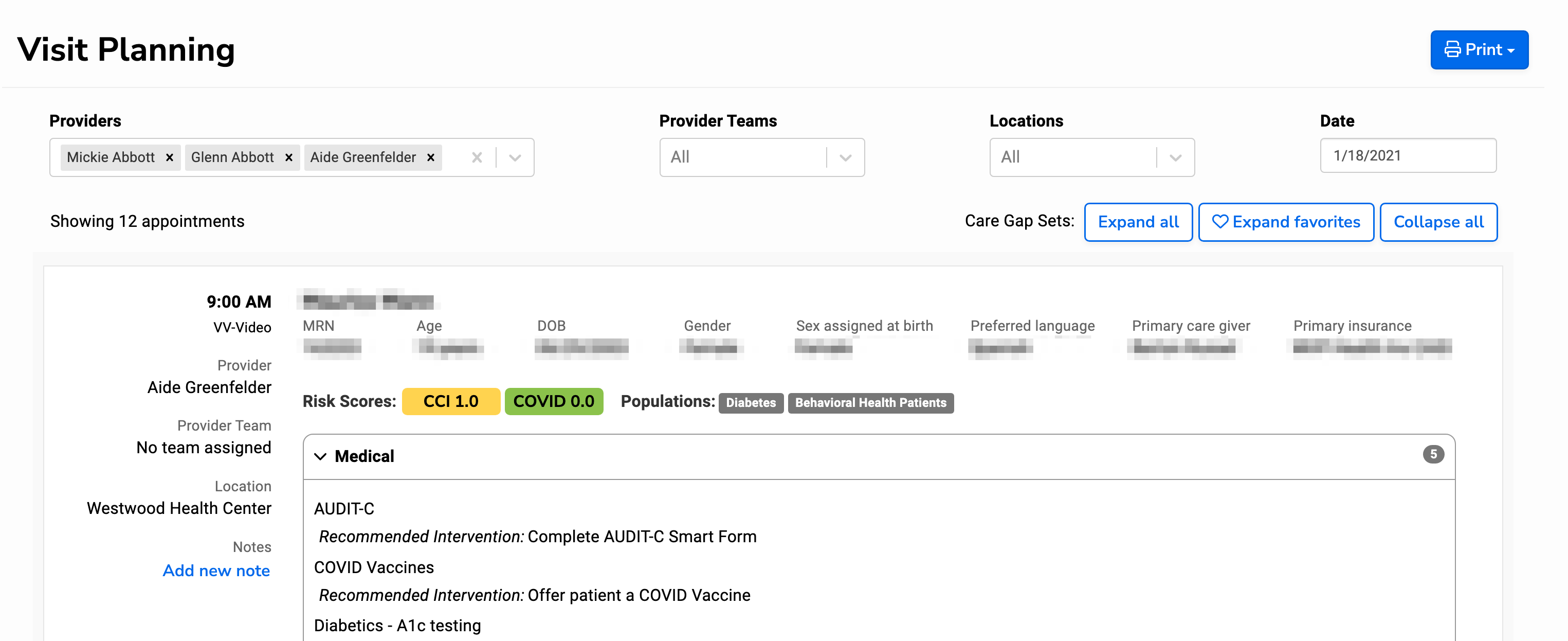
- In Visit Planning, filters for providers, provider teams, and visit location are now visible at all times, making life easier for MAs handling multiple provider schedules. See what it looks like here.
- We’ve added new reference tables with value sets and medication lists from CMS and NCQA. See the reference tables documentation for details about how they work, when they’re updated, and more.
- Following best practices for accessibility, clicking a link within Relevant will no longer open a new browser tab, unless the link is specifically marked with an “external” icon.
- For keyboard shortcut aficionados: typing control+enter or cmd+enter will now run a report in Report Builder.
- A new how-to for report builders walks through the why and how of Adding a “Blank” option for custom report parameters.
- A new database function, called
safe_to_date, can be used to clean up messy date values in EHR data. Read more in our new database functions documentation. - Last but not least: our login page got a spiffy new look. 🎨
2022 and previous
For older changes, the best source is our newsletter archive.