
About the Library
Introduction
The team at Relevant—along with health center data analysts around the country—have spent thousands of hours building quality measures, reports, dashboards, and other items. Instead of reinventing the wheel to meet common needs, you can browse a selection of these items in the Library, and import them into your instance of Relevant.
We’ve got reports covering clinical and operational needs, finance, data validation, and “utility” reports (such as “SQL Search” and “Report Runs”). We’ve got quality measures covering a variety of clinical needs, with more to come. We’ve got transformers covering a variety of EHRs, and we’ve got default mappings for many data elements.
Right now, Relevant’s staff curates the contents of the Library. In the future, we hope it becomes a place where users can directly share some of the incredible things they’ve built in Relevant.
Using the Library
Accessing reports in the Library requires the “Manage Reports” and “Read PHI” abilities. Accessing quality measures in the Library requires the “Manage Pipeline” and “Read PHI” abilities. Accessing transformers or data elements in the Library requires the “Manage Pipeline” ability. Read more about roles and abilities.
The “Library” link is available in the main navigation bar, at the top of the screen in Relevant. If you can’t see see the Library menu item in the main navigation bar, you may need additional permissions; please reach out to the Relevant project team at your health center.
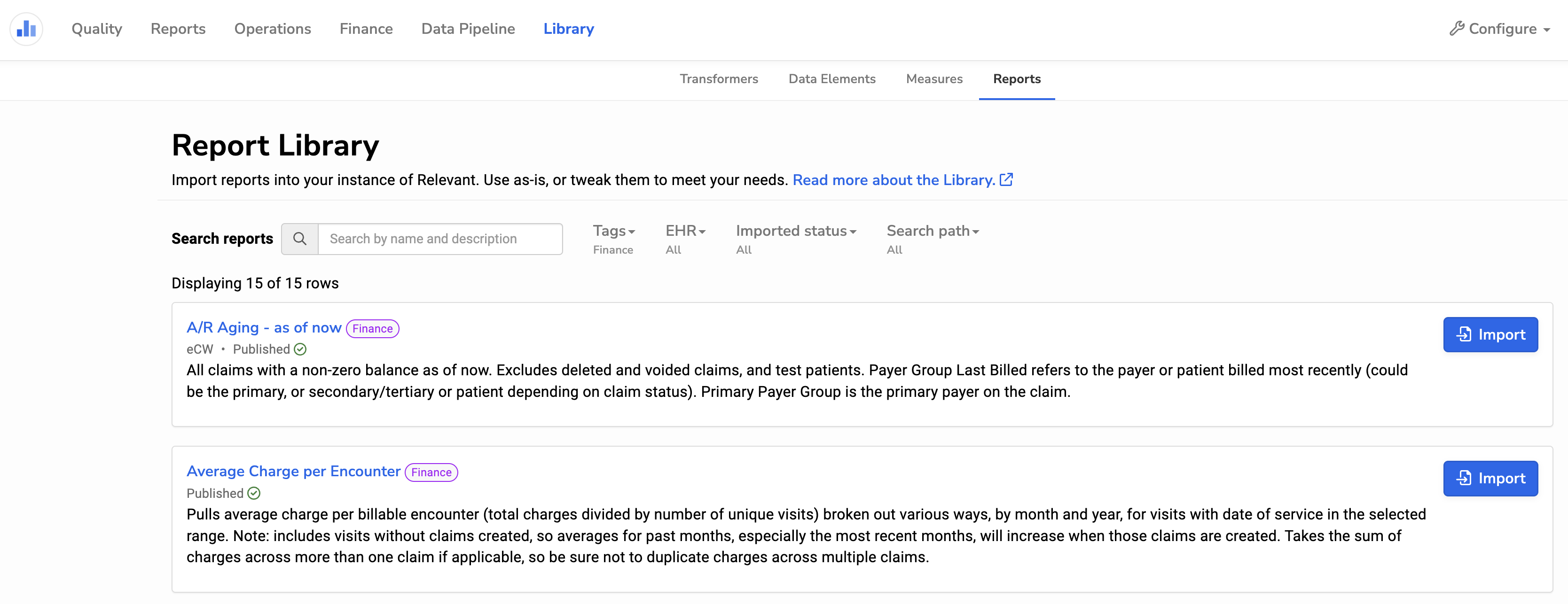
The Library works similarly for Reports, Quality Measures, Transformers, and Data Elements. In each case, you can browse, search, or filter to find an item of interest, view its details, and import it into your instance of Relevant.
Library items cannot be run directly: before running, editing, or sharing a library item, you’ll need to click the “Import” button. Once you’ve imported the item into your instance in Relevant, you can then edit it as you like. Data elements can only be imported if you don’t already have that data element mapped - otherwise, you can click “Remap from library” (from the pipeline data element page) to overwrite your definition and use the default mapping that Relevant has created.
Frequently asked questions
Q: I imported something from the Library, but it doesn’t work.
A: Not all Library items will work in all circumstances. If you’ve imported a measure, confirm that its required data elements are properly mapped. If you’ve imported a report, check whether it’s based on the rdm schema, or other schema. Reports written on non-rdm schemas are typically useful for a specific EHR, and are more likely to require tweaks on a per-health-center basis.
Q: Can I change an item after I import it from the Library?
A: Yes. Once you import an item from the Library, you can edit it however you like in your instance of Relevant.
Q: What happens if a Library item I’ve already imported gets updated in the library?
A: Updates to an item in the Library will not automatically update the copy that you imported. We may consider this feature in the future, but it’s complex because we don’t want to overwrite any customizations you’ve made after importing the Library item.
Q: How do you decide what goes in the Library?
A: Our goal is to provide items of general interest to health centers, prioritizing items that are commonly requested. We are curating the initial contents of the Library to ensure that its quality remains high.
Q: Are care gaps, dashboards, populations, or risk models included in the Library?
A: No. We piloted the Library with reports and quality measures, with transformers and data elements added in July 2024. We will consider adding additional items in the future - please let your Relevant lead know if you would want this.
Q: How can I add a report or measure we’ve developed?
A: Submissions are welcome and encouraged. Email us at support@relevant.healthcare and provide a link to the report, measure, or other item you’d like us to add. In the future, we will consider adding the ability for users to share items to the Library directly.