
Validating Quality Measures
Note: to validate you will need the “Read Data Pipeline” and “Read PHI” abilities. These are often included in a “Validation” Role. If you are unable to follow the directions below, please reach out to the Relevant lead at your organization to provide you with the appropriate Role(s).
Prerequisites
- Visits are validated
- Patients are validated
- UDS Medical Visits have been defined: most Measures rely on UDS Medical Visits, so Measures will not be accurate until these are mapped correctly
Random samples
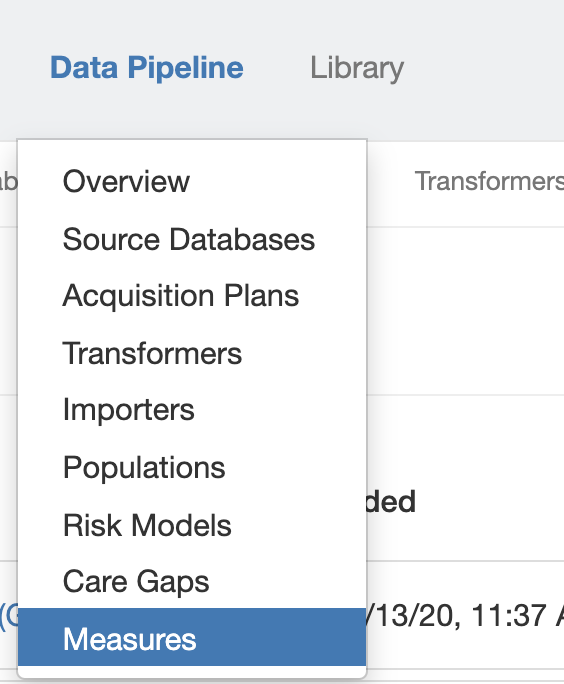
At top in the Navigation Bar, click Data Pipeline and select Measures.
Click on the name of the Measure you’d like to Validate, then click Actions.
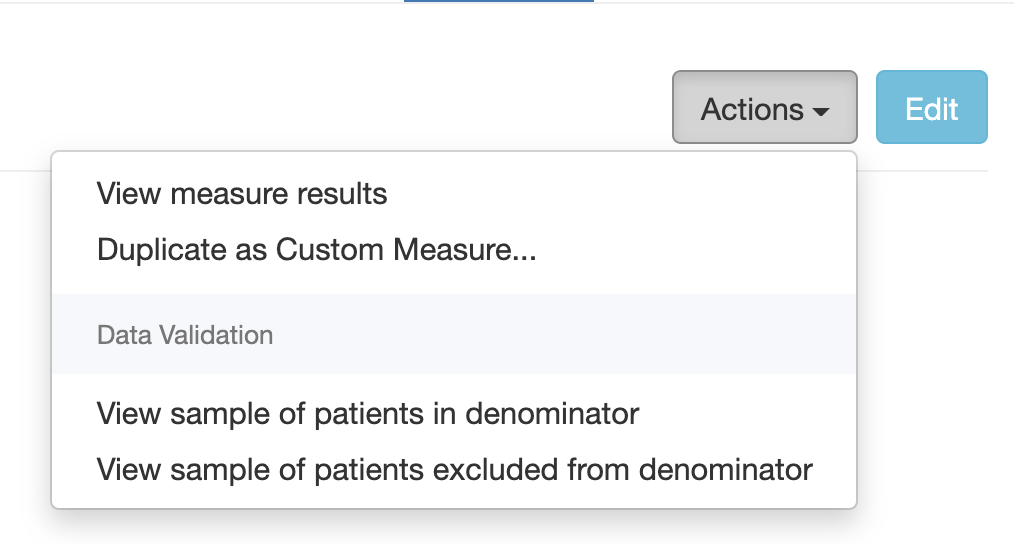
Click View sample of patients in denominator to generate a random sample of 20 Patients in the Measure denominator for the most recent measurement period.

Check the data points for each Patient against what you see in the EHR. If you notice any issues, click Report discrepancy at right, provide details on what should be fixed in the Description box, then click Send.
Repeat the process of validating random samples of Patients until you are confident the data is correct.
Then, click View sample of patients excluded from the denominator to generate a random sample of 20 Patients excluded from the Measure. Repeat the steps listed above to Validate the exclusion mapping, and report any Discrepancies you find. If this returns no Patients, it is because the Measure has no exclusions or no Patients meet the exclusion conditions.
Note: Relevant does not save the randomly generated list, so if you’d like to keep them for future reference, be sure to click Export to save the list as an Excel file.
Line-level comparisons
If you already have measures that you trust, Relevant can work with you to do line-level validation to address differences between your measures and those in Relevant. If you provide Relevant with patient-level detail on a Quality Measure, Relevant can provide:
- Patients in your denominator but not in Relevant’s, and vice versa
- Patients in both denominators with different numerator statuses (in the numerator in your report, not in the numerator in Relevant, and vice versa)
This approach is particularly useful for catching rare edge cases.