
Windows ODBC Setup
This setup is not as easy as the others. Don’t hesitate to ask us for help.
To create a data source using the Windows ODBC driver, follow the guide to creating a PostgreSQL ODBC connection on Windows 10. You will need to download the latest release of the postgres driver.
When creating the data source, click into Advanced Options (the button may be labeled “Datasource”) in order to provide the paths to the SSL Client Certificates. On page 3 of of the advanced options, the libpq parameters need to be in the form:
sslrootcert=C:\\some_folder\\root.crt sslcert=C:\\some_folder\\client.crt sslkey=C:\\some_folder\\client.key
Note the double backslashes in the file paths. Also, each value is separated only by a space.
Also note: the “connection test” button in the screenshot below is broken in the latest ODBC driver (as of 5/10/2023), so you must close the Advanced Options before testing the connection.
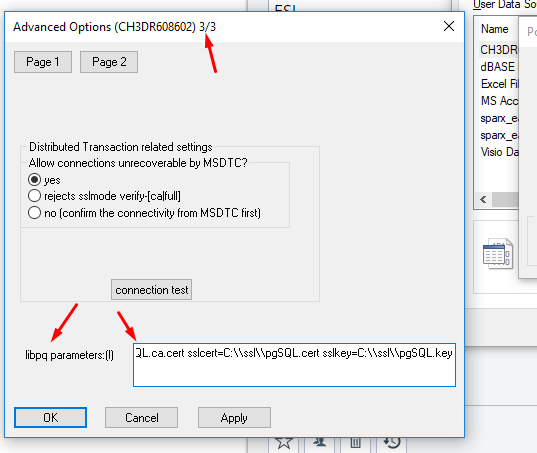
See this Stack Overflow post as a reference.