
About the Data Warehouse
Relevant’s data warehouse contains raw data from the EHR, plus the cleaned and standardized data that results from Relevant’s nightly data pipeline run. The data warehouse can also hold data from other sources (e.g. care management systems, dental EHRs, managed care rosters), as well as custom tables to meet specific reporting needs. It’s designed to be flexible, and to function as the single source of truth for reporting at your health center.
You don’t need to know anything about the data warehouse to use the screens in Relevant’s web application. However, if you are a technical user, you may want to access the data warehouse directly. You can do so by writing reports in Report Builder, or by connecting external tools, such as query editors or BI applications.
Data warehouse structure
To keep the data warehouse organized, we make use of a feature called schemas. Schemas are an organizational unit within a database—essentially, a way to group related tables. The main schemas in Relevant’s data warehouse are described below.
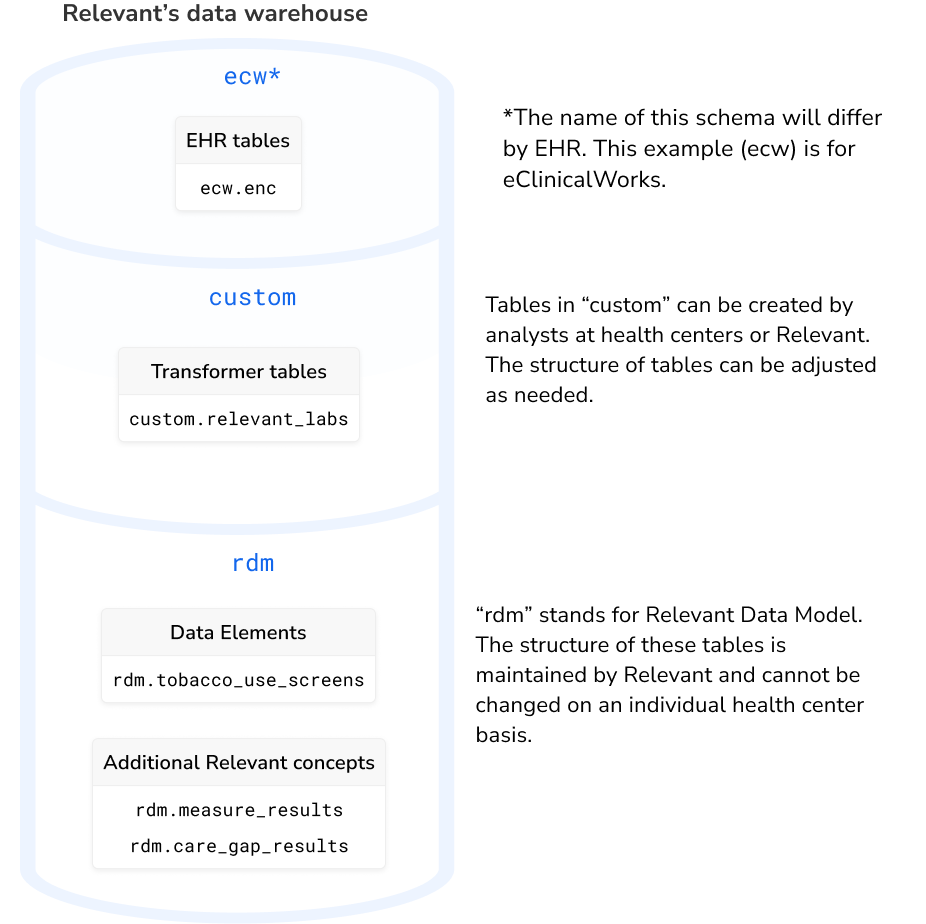
EHR schemas: The tables acquired directly from the EHR are placed into a schema with a corresponding names, such as ecw or intergy. Typically, these tables will have the same structure and contents as they do in the EHR database. Not every table in the EHR will be included by default; you can adjust which tables are brought into Relevant by configuring the data acquisition plan.
custom: Tables that are created by transformers live in a schema called custom. In a typical data pipeline setup, these tables are the first step in cleaning up and “transforming” the raw EHR data. In this schema, health center analysts can create tables and modify their structure as needed. The name “custom” is meant to signal the flexibility that’s possible here. Note: if you use Relevant’s CSV Upload feature, uploaded tables will also be placed here.
rdm: Relevant’s standard tables live in a schema called rdm, which stands for Relevant Data Model. This schema includes all of the tables generated by the data pipeline after the Transformers step, including Data Elements, Populations, Risk Models, Care Gaps, and Measures. In addition, “rdm” includes text messaging data from Relevant Outreach, as well as metadata about Relevant’s web application. Since the tables and columns in this schema are consistent, health centers and HCCNs can easily share and import report definitions that rely on it, even across EHRs.
Frequently asked questions
Q: What data does not exist in the data warehouse?
A: Some pages in Relevant, such as Data Explorer and Report Builder, compute data when run by the user. The data displayed after each run is not stored in the data warehouse. If you need to create a permanent record of a particular report run, we recommend exporting the results of the report or data explorer.
Q: Why can’t I drop tables in the rdm schema?
A: The rdm schema is meant to hold Relevant’s standard tables, and many parts of Relevant depend heavily on the rdm schema having a specific shape. To ensure you can keep using all of Relevant’s features, dropping tables in rdm is not permitted. If you need to drop and re-create a table while writing a report or other SQL, use temporary tables by ensuring you use the TEMP or TEMPORARY keyword in a CREATE TEMP TABLE ... statement.