
Data Acquisition Agent FAQ
The Data Acquisition Agent (DAA) extracts and loads data from your source database(s) into your Relevant data warehouse. It can be configured by Relevant users with the appropriate permissions.
It stands out in several key ways:
- It has no external dependencies; it is simple to install and maintain.
- It is always running in the background and is self-monitoring. If something goes wrong at any time of day, we will know in minutes.
- The same code runs for all Relevant instances. We can make sure every instance is running the most recent version, without need for down time.
- It securely moves data between networks without a site-to-site VPN.
- Everything about the acquisition is configurable from the Relevant website, including which tables are acquired and when.
Frequently Asked Questions
Q: What happens if something goes wrong, like the network or source database goes down?
A: When anything goes wrong, Relevant staff and other identified users will receive an error alert via email. The DAA has been designed to maximize the reliability of the acquisition process. To this end, we’ve built in retry logic wherever something may go wrong. This includes all requests to the Relevant server, the Google Cloud API, and the source databases. Most issues will be resolved automatically without manual intervention.
After a certain amount of time, the DAA will stop retrying and fail the acquisition. At this point, the error message will appear on the Pipeline Overview screen. In this case, manual intervention is required. Relevant staff will have been notified, and if needed they will assist you in fixing the underlying issue and re-scheduling the failed Acquisition Plan.
Q: Will we need to restart the DAA every time we restart the jump box?
A: No, you will not. The DAA is installed as a “service” that is configured to restart automatically when the jump box restarts. You should never need to manually restart the DAA.
Q: What happens if the jump box restarts while the DAA is acquiring data?
A: The DAA will restart itself, but the acquisition that was interrupted will not automatically resume. The acquisition will need to be manually restarted in Relevant.
Q: How can I manually restart an acquisition plan?
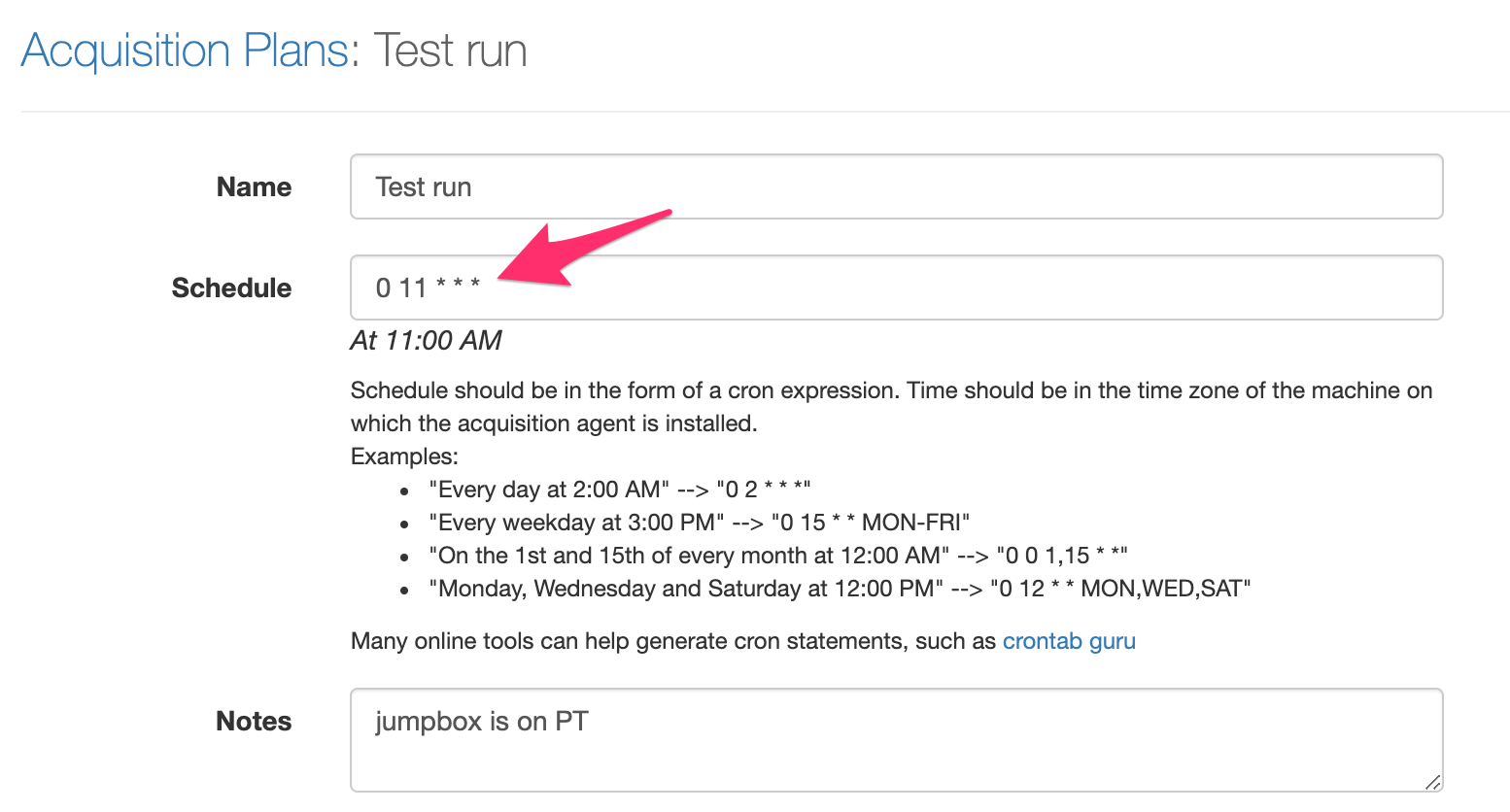
A: The acquisition can be restarted by editing its schedule so that it is scheduled a few minutes into the future. Remember to reset the schedule after the acquisition has restarted.
Note that running the data acquisition and pipeline is resource-intensive, and may slow down Relevant for other users; therefore, consider waiting for the next nightly run to happen as scheduled instead of manually restarting.
Q: Since the DAA is always running on the jump box, will it interfere with other tasks/jobs/processes that run throughout the day?
A: No, it will not interfere with anything else happening on the jump box. It uses a negligible amount of CPU and memory when not acquiring data. It is normal for a machine to have many processes running in the background.
Q: How many connections will the DAA take out with the source database while acquiring data?
A: By default, the DAA will try to acquire all tables concurrently, and thus will take out about one connection per table. If there are 70 tables to acquire, for example, it will take out about 70 connections. When necessary, it is possible to set a maximum number of open connections when configuring your source database(s). Generally, the greater the number of open connections, the faster the acquisition.
Q: What if we want to perform our own monitoring of the extraction process on the jump box?
A: We write logs on the machine that is running the DAA, so if the DAA is running on a jump box you’ve provided, then you can access these logs and perform your own monitoring if desired. Let us know if you would like to do so and we can direct you to these log files.
You can also use the Mailing List feature to subscribe to email alerts when an acquisition plan fails.
Q: We’re switching to a new EHR. Will the DAA support it?
A: The DAA supports a number of different EHRs. If you are switching to a different EHR, we expect the DAA will support it. The EHR itself does not matter as much as the type of backend data access provided. We currently support the following data sources (and the list is growing):
- eCW + Microsoft SQL Server (on-premise or cloud)
- eCW + MySQL (on-premise or cloud)
- NextGen + Microsoft SQL Server
- NextGen + MySQL
- Athena + Snowflake Cloud Data Warehouse
- Intergy + Progress OpenEdge (note: this requires a licensed ODBC driver)
- Allscripts + Microsoft SQL Server
- Allscripts + MySQL
- EPIC Clarity (Microsoft SQL Server)
Most of our customers use MySQL or Microsoft SQL Server. If you are going to create your own database instance, we can support:
- MySQL 4.1 or newer
- Microsoft SQL Server 2005 or newer (Note: we cannot support SQL Server 2008 and 2008 R2 -these must be upgraded to SQL Server 2008 R3 because of a known issue.)
Q: How much disk space will the DAA need? What about memory?
A: The DAA does not write data onto the disk, so it does not need much disk space at all. Instead, the DAA streams the data directly to Relevant’s Google Cloud Storage bucket. The DAA does write logs to disk, and those log files are capped at 1GB of disk space. During an acquisition, memory usage grows linearly with the number of concurrent table acquisitions but is typically no more than a few gigabytes, even during a very large acquisition (hundreds of GBs of data). Note that we’ve observed higher memory usage when pulling from Snowflake Cloud Data Warehouse. 10 GB of disk space and 4 GB of memory are recommended at a minimum.
Q: How is data kept secure without a VPN?
A: During installation, we provide a secure API token that is used to authorize the DAA with our Google Cloud project. Once authorized, all network operations use transport-layer encryption (HTTPS) to secure data in transit. For Google Cloud’s detailed documentation on storage security and privacy considerations, see the Google Cloud Storage security documentation.
Q: Does the DAA extract data diffs or all data every time?
A: The DAA will extract all data every time. We’ve found this strategy to be much simpler than extracting data diffs and fast enough for the purposes of a nightly data pipeline.
Q: How can a user add tables to an Acquisition Plan?
A: Please reference this detailed video with instructions for adding tables from a source database to an Acquisition Plan.